> For the complete documentation index, see [llms.txt](https://cll-devrel.gitbook.io/ccip-bootcamp/llms.txt). Markdown versions of documentation pages are available by appending `.md` to page URLs; this page is available as [Markdown](https://cll-devrel.gitbook.io/ccip-bootcamp/mandarin-ccip-bootcamp/di-1-tian/ru-he-shi-yong-chainlink-ccip.md).

# 如何使用 Chainlink CCIP

CCIP 最简架构

&#x20;总结一下，通过 Chainlink CCIP，可以：

* 转移（支持的）代币
* 发送任何类型的数据
* 发送代币和数据

CCIP 接收者可以是：

* EOA（外部拥有的账户）
* 任何实现了 CCIPReceiver.sol 的智能合约

<figure><img src="/files/9qj91aGCBnQzGYSww3Vs" alt=""><figcaption><p>CCIP基本架构</p></figcaption></figure>

**注意**：如果您向 EOA 发送消息和代币，只有代币会到达。

目前，您可以将 CCIP 视为一个“黑盒”组件，并且只需关注 Router 合约。我们将在后续章节中解释 Chainlink CCIP 的架构。

### 开始入门 <a href="#getting-started" id="getting-started"></a>

您可以使用任何区块链开发框架来使用 Chainlink CCIP。对于本次大师班，我们准备了 Hardhat、Foundry 和 Remix IDE 的步骤。

让我们创建一个新项目。

{% tabs %}
{% tab title="Hardhat" %}
确保您已安装 [Node.js](https://nodejs.org/en/download) 和  [NPM](https://docs.npmjs.com/downloading-and-installing-node-js-and-npm) 。要检查，请运行以下命令：

```sh
node -v
```

```sh
npm -v
```

创建一个新文件夹并命名为 `ccip-masterclass`：

```sh
mkdir ccip-masterclass
```

切换该文件夹：

```sh
cd ccip-masterclass
```

通过运行以下命令创建一个新的 Hardhat 项目：

```shell
npx hardhat@2.14.1 init
```

然后选择  “Create a JavaScript project”  或 “Create a TypeScript project”。
{% endtab %}

{% tab title="Foundry" %}
确保您已安装 Foundry。要检查，请运行以下命令：

```sh
forge --version
```

创建一个新文件夹并命名为 `ccip-masterclass`：

```sh
mkdir ccip-masterclass
```

切换该文件夹：

```sh
cd ccip-masterclass
```

通过运行以下命令创建一个新的 Foundry 项目：

```sh
forge init
```

{% endtab %}

{% tab title="Remix" %}
导航到 <https://remix.ethereum.org/> 并点击“Create new Workspace”按钮
{% endtab %}
{% endtabs %}

或者，您可以克隆以下项目：

* [CCIP 入门套件  (Hardhat 版本)](https://github.com/smartcontractkit/ccip-starter-kit-hardhat)
* [CCIP 入门套件  (Foundry 版本)](https://github.com/smartcontractkit/ccip-starter-kit-foundry)

### @chainlink/contracts-ccip NPM 包 <a href="#the-chainlink-contracts-ccip-npm-package" id="the-chainlink-contracts-ccip-npm-package"></a>

要使用 Chainlink CCIP，你需要与 [@chainlink/contracts-ccip](https://www.npmjs.com/package/@chainlink/contracts-ccip) NPM 包中的 Chainlink CCIP 专用合约进行交互。

{% embed url="<https://www.npmjs.com/package/@chainlink/contracts-ccip>" %}

要安装它，请按照针对您将用于本次大师班的开发环境的特定步骤进行操作。

{% tabs %}
{% tab title="Hardhat" %}

```bash
npm i @chainlink/contracts-ccip --save-dev
```

{% endtab %}

{% tab title="Foundry" %}
**选项 1)**

我们不能使用 git 子模块来安装 `@chainlink/contracts-ccip`，因为这个包的内容并没有作为一个单独的 GitHub 仓库提供。这意味着我们不能运行 `forge install` 命令。\
\
以下是解决方法：

&#x20;在 `.gitignore` 文件中添加以下行

```gitignore
# Node modules
node_modules/
```

然后在终端中运行以下命令：

```sh
npm i @chainlink/contracts-ccip --save-dev
```

最后，在 `foundry.toml` 文件中添加以下几行：

```toml
libs = ['node_modules', 'lib']
remappings = [
    '@chainlink/contracts-ccip/=node_modules/@chainlink/contracts-ccip'
]
```

**选项 2) \[2023年10月更新]**

你可以运行

```sh
forge install smartcontractkit/ccip@ccip-develop
```

之后在 `foundry.toml` 或 `remappings.txt` 文件中设置 remappings：

```toml
# foundry.toml
remappings = [
    '@chainlink/contracts-ccip/=lib/ccip/contracts/'
]
```

{% endtab %}

{% tab title="Remix" %}
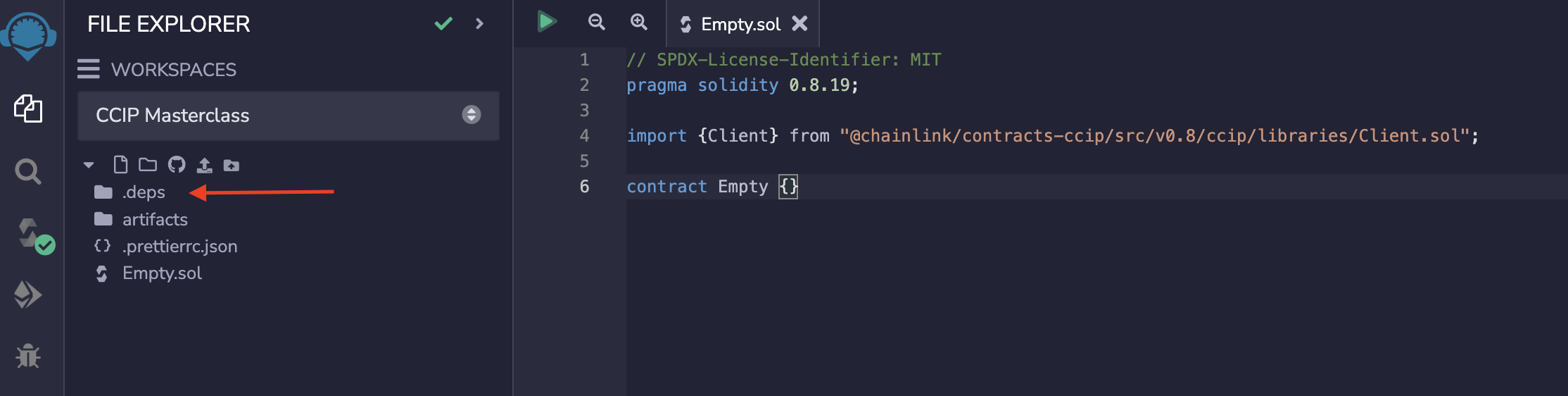
创建一个新的 Solidity 文件，并粘贴以下内容。这是一个空合约，只是导入了 `@chainlink/contracts-ccip` 包中的一个合约。

```solidity
// SPDX-License-Identifier: MIT
pragma solidity 0.8.19;

import {Client} from "@chainlink/contracts-ccip/src/v0.8/ccip/libraries/Client.sol";

contract Empty {}
```

编译它。如果编译成功并生成了新的 `.deps/npm/@chainlink/contracts-ccip` 文件夹，这意味着我们已将 `@chainlink/contracts-ccip` 包导入到 Remix IDE 工作区。

<figure><img src="/files/hhvEetyVizRTBWQiZgjH" alt=""><figcaption><p>Remix IDE 编译</p></figcaption></figure>
{% endtab %}
{% endtabs %}

## 基础接口

尽管如前所述，CCIP 的发送者和接收者可以是 EOA（外部拥有的账户）和智能合约，并且所有组合都是可能的，我们将要介绍最复杂的情况，即 CCIP 的发送者和接收者都是位于不同区块链上的智能合约。

#### 源区块链 <a href="#source-blockchain" id="source-blockchain"></a>

要发送 CCIP 消息，源区块链上的智能合约必须调用 `ccipSend()`函数，该函数定义在`IRouterClient.sol`接口中。

```solidity
// SOURCE BLOCKCHAIN 

interface IRouterClient {
    /// @notice 请求发送 CCIP 消息到目标链
    /// @param destinationChainSelector 目标链选择器
    /// @param message 包含数据和/或代币的跨链 CCIP 消息
    /// @return messageId 消息 ID
    function ccipSend(
        uint64 destinationChainSelector,
        Client.EVM2AnyMessage calldata message
    ) external payable returns(bytes32 messageId);
}
```

正在发送的CCIP消息是来自`Client`库中的`EVM2AnyMessage` Solidity 结构体。

```solidity
// SOURCE BLOCKCHAIN

library Client {
    struct EVM2AnyMessage {
        bytes receiver; // 目标 EVM 链上的接收者地址，使用 abi.encode(receiver address)
        bytes data; // 数据负载
        EVMTokenAmount[] tokenAmounts; // 转移的代币地址和数量
        address feeToken; // 费用代币地址；address(0) 表示你发送 msg.value
        bytes extraArgs; // 使用 _argsToBytes(EVMExtraArgsV1) 填充此字段
    }
    
    struct EVMTokenAmount {
        address token; // 本地区块链上的代币地址
        uint256 amount;
    }
    
    struct EVMExtraArgsV1 {
        uint256 gasLimit;
        bool strict;
    }
}
```

现在让我们理解一下我们正在发送的`EVM2AnyMessage`结构体的每个属性代表什么以及如何使用它。

**receiver (接收者)**

接收者合约的地址。它可以是智能合约或外部拥有的账户（EOA）。使用`abi.encode(receiver)`将地址编码为 Solidity 的字节数据类型。

**data (数据)**

通过 CCIP 消息发送的数据。这正是我们所说的 CCIP 消息可以携带的“任意类型的数据”。这些数据可以简单到像是“Hello, world!”这样的文本，也可以复杂到 Solidity 编写的结构体或者函数的签名。

**tokenAmount (代币数量)**

源链上表示的代币及其数量。这里我们指定了我们正在发送的代币（出自支持的代币）以及数量。这是一个`EVMTokenAmount`结构体数组，它只包含两个属性：

* `token(代币)`- 我们在本地（源）区块链上发送的代币的地址
* `amount(`数量`)` 我们正在发送的代币数量。发送者必须批准CCIP路由器代表发送者花费这个数量，否则对`ccipSend`函数的调用将会回滚。&#x20;

目前，单一 CCIP 发送交易中可以发送的代币数量最多为5个。

**feeToken (**&#x8D39;用代&#x5E01;**)**

`feeToken` 是费用代币的地址。CCIP 支持使用 LINK 以及包括原生区块链原生代币（能支付gas fee的代币）和它们的 ERC20 包装版本在内的替代资产来支付费用。对开发者而言，这意味着你可以在源链上轻松支付费用，而 CCIP 将负责在目标链上执行操作。若要使用原生代币支付，例如在以太坊上的 ETH 或者在 Polygon 上的 MATIC，可以将 `feeToken` 设置为`address(0)`。即便使用原生资产支付费用，Chainlink 去中心化预言机网络（DON）中的节点只会得到 LINK 作为奖励

**extraArgs (额外参数)**

用户填写`EVMExtraArgsV1`结构体，然后使用`_argsToBytes`函数将其编码为字节。该结构体由两个属性组成：

* `gasLimit` - CCIP 在目标区块链上的合约执行`ccipReceive()`可以消耗的最大 gas 数量。未用完的 gas 不会退还。这意味着，例如，如果你将代币发送到 EOA，你应该把`gasLimit`值设为0，因为EOA 无法实现`ccipReceive()`（或任何其他）函数。为了估计目标合约的准确 gas limit（要使用的 gas 数量），请考虑利用 Ethereum 客户端 RPC 通过在`receiver.ccipReceive()`函数上应用`eth_estimateGas`，或者使用 [Hardhat插件进行gas测试](https://github.com/cgewecke/eth-gas-reporter) ，或者进行 [Foundry gas测试](https://book.getfoundry.sh/forge/gas-tracking) 。
* `strict` - 用于严格排序。**你应该将其设置为`false`**。CCIP将始终按发送顺序处理来自特定发送者到特定目标区块链的消息。如果你在消息的`extraArgs`部分设置`strict: true`，并且如果`ccipReceive`失败（回滚），***它将阻止来自同一发送者的任何后续消息被处理，直到当前消息成功执行***。使用此功能时应该非常小心，以避免无意中停止发送者的消息被处理。严格排序功能目前是实验性的，未来不保证其维护或进一步开发。

如果未指定 `extraArgs`，即设置为 `extraArgs: ""`，默认情况下将应用 *200\_000* 的 `gasLimit` 并且不启用严格顺序。在生产环境中部署时，请确保 `extraArgs` 是可更改的。这允许您在链下构建此参数，并在需要时通过函数调用传递或存储在可更新的变量中。这样的设计使得 `extraArgs` 能够适应未来对CCIP的任何升级。

#### 目标区块链 <a href="#destination-blockchain" id="destination-blockchain"></a>

目标区块链上的智能合约要接收 CCIP 消息，必须实现`IAny2EVMMessageReceiver`接口。[@chainlink/contracts-ccip](https://www.npmjs.com/package/@chainlink/contracts-ccip) NPM 包提供了正确实现此接口的合约，称为 `CCIPReceiver.sol`，但在接下来的章节中我们会更多地讨论它。现在，让我们理解在一般场景下必须实现的`IAny2EVMMessageReceiver`接口的哪些函数。

```solidity
// DESTINATION BLOCKCHAIN

/// @notice 打算从路由器接收消息的应用合约应实现此接口。
interface IAny2EVMMessageReceiver {
    /// @notice 路由器调用此函数以传递消息
    /// @param message CCIP 消息
    /// @dev 注意确保你检查 `msg.sender` 是路由器
    function ccipReceive(Client.Any2EVMMessage calldata message) external;
}
```

如您所见，`IAny2EVMMessageReceiver`接口中的`ccipReceive()`函数接受来自 **Client** 库的`Any2EVMMessage`结构体对象。这个结构体是接收到的CCIP消息在Solidity中的表现形式。请注意，这个`Any2EVMMessage`结构体与我们在源区块链上用于发送的结构体——`EVM2AnyMessage`——是**不同**的。它们并不相同。

```solidity
// DESTINATION BLOCKCHAIN

library Client {
    struct Any2EVMMessage {
        bytes32 messageId; // 源链上的 `ccipSend` 对应的消息 ID
        uint64 sourceChainSelector; // 源链选择器
        bytes sender; // 如果来自 EVM 链，使用 `abi.decode(sender)`
        bytes data; // 在原始消息中发送的负载
        EVMTokenAmount[] tokenAmounts; // 在目标链上的代币及其数量
    }
    
    struct EVMTokenAmount {
        address token; // 本地区块链上的代币地址
        uint256 amount;
    }
}
```

现在让我们理解一下我们接收到的`Any2EVMMessage`结构体的每个属性代表什么以及如何使用它：

* `messageId` - CCIP消息ID，在源链生成。
* `sourceChainSelector` - 源链选择器。
* `sender` - 发送者地址。如果源链是EVM链，使用`abi.decode(sender, (address))`进行解码。
* `data` - CCIP消息中发送的有效载荷。例如，"Hello, world!"。
* `tokenAmounts` - 接收到的代币及其在目标链上的表示形式的金额。

回顾一下，下面是所需的最小架构图，用于发送和接收Chainlink CCIP消息：

<figure><img src="/files/uCOD3ZtLpuAIlmBm3IGS" alt=""><figcaption><p>Developer interfaces</p></figcaption></figure>


---

# Agent Instructions
This documentation is published with GitBook. GitBook is the documentation platform designed so that both humans and AI agents can read, navigate, and reason over technical content effectively. Learn more at gitbook.com.

## Querying This Documentation
If you need additional information that is not directly available in this page, you can query the documentation dynamically by asking a question.

Perform an HTTP GET request on the current page URL with the `ask` query parameter:

```
GET https://cll-devrel.gitbook.io/ccip-bootcamp/mandarin-ccip-bootcamp/di-1-tian/ru-he-shi-yong-chainlink-ccip.md?ask=<question>
```

The question should be specific, self-contained, and written in natural language.
The response will contain a direct answer to the question and relevant excerpts and sources from the documentation.

Use this mechanism when the answer is not explicitly present in the current page, you need clarification or additional context, or you want to retrieve related documentation sections.